
MQTT client · Modbus TCP/RTU client · OPC UA client
One desktop workbench for MQTT, Modbus and OPC UA, with an MCP server for AI agents.
Browse an MQTT broker, poll Modbus registers and subscribe to OPC UA nodes in one app for Windows, Linux and macOS. Production connections are write-protected, keys activate offline on air-gapped networks, and a built-in MCP server lets Claude and other AI agents read the same tags you see, read-only unless you allow more.
Free forever core · Pro $99 one-time · Team $149 per seat a year · Pricing
| Source | Tag | Value |
|---|---|---|
| MQTT | plant1/press/temperature | 182.4 °C |
| Modbus | 10.0.4.12:502 · HR 40001 · FLOAT32 ABCD | 3.75 bar |
| RTU | COM3 · unit 7 · IR 30010 · UINT16 | 1 480 rpm |
| OPC UA | ns=2;s=Line1.Oven.Zone2.Temp | 214.0 °C |
| MQTT | spBv1.0/Plant1/DDATA/edge1/meter | 41.2 kW |
read_topic("plant1/press/temperature")Screenshots
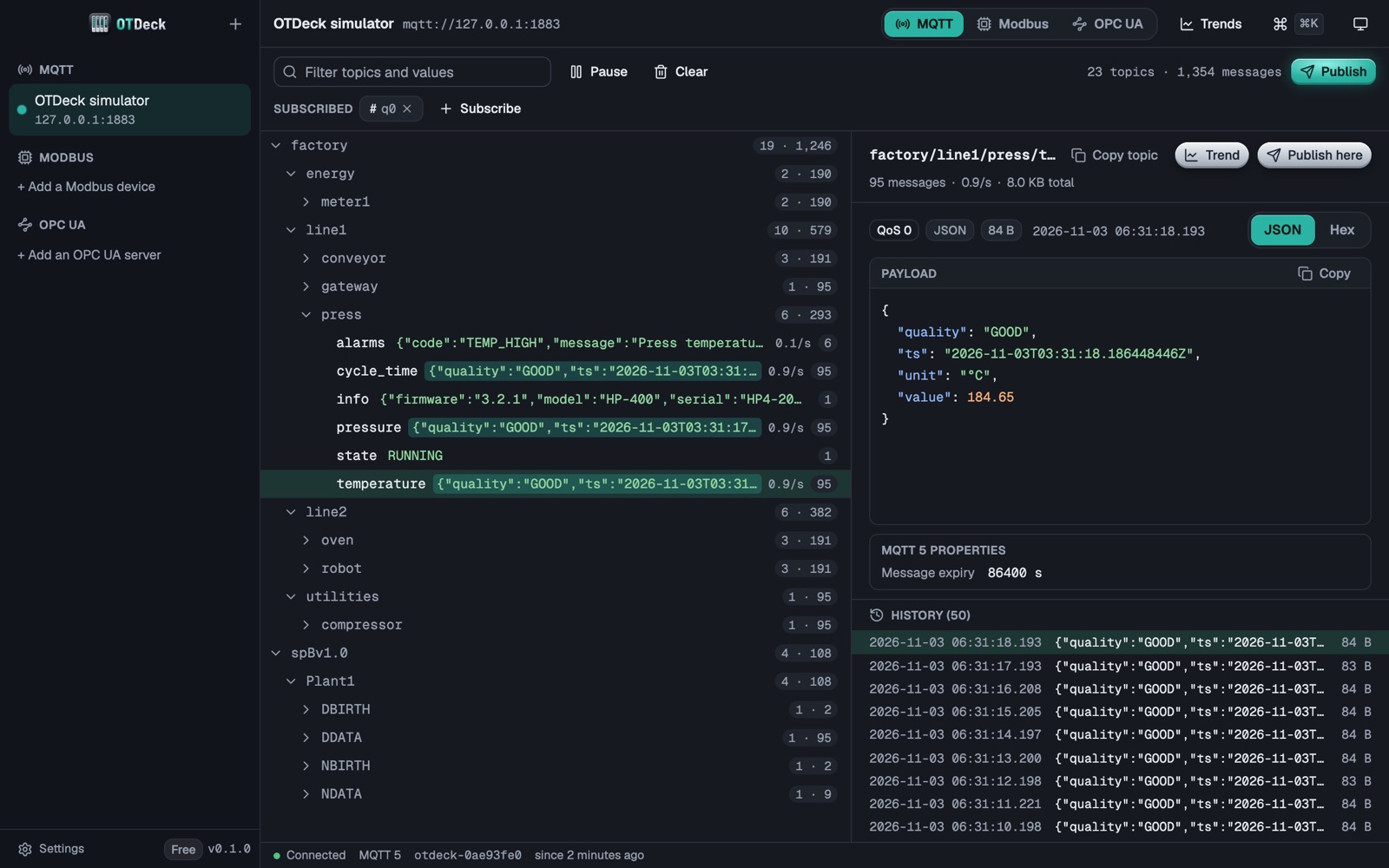
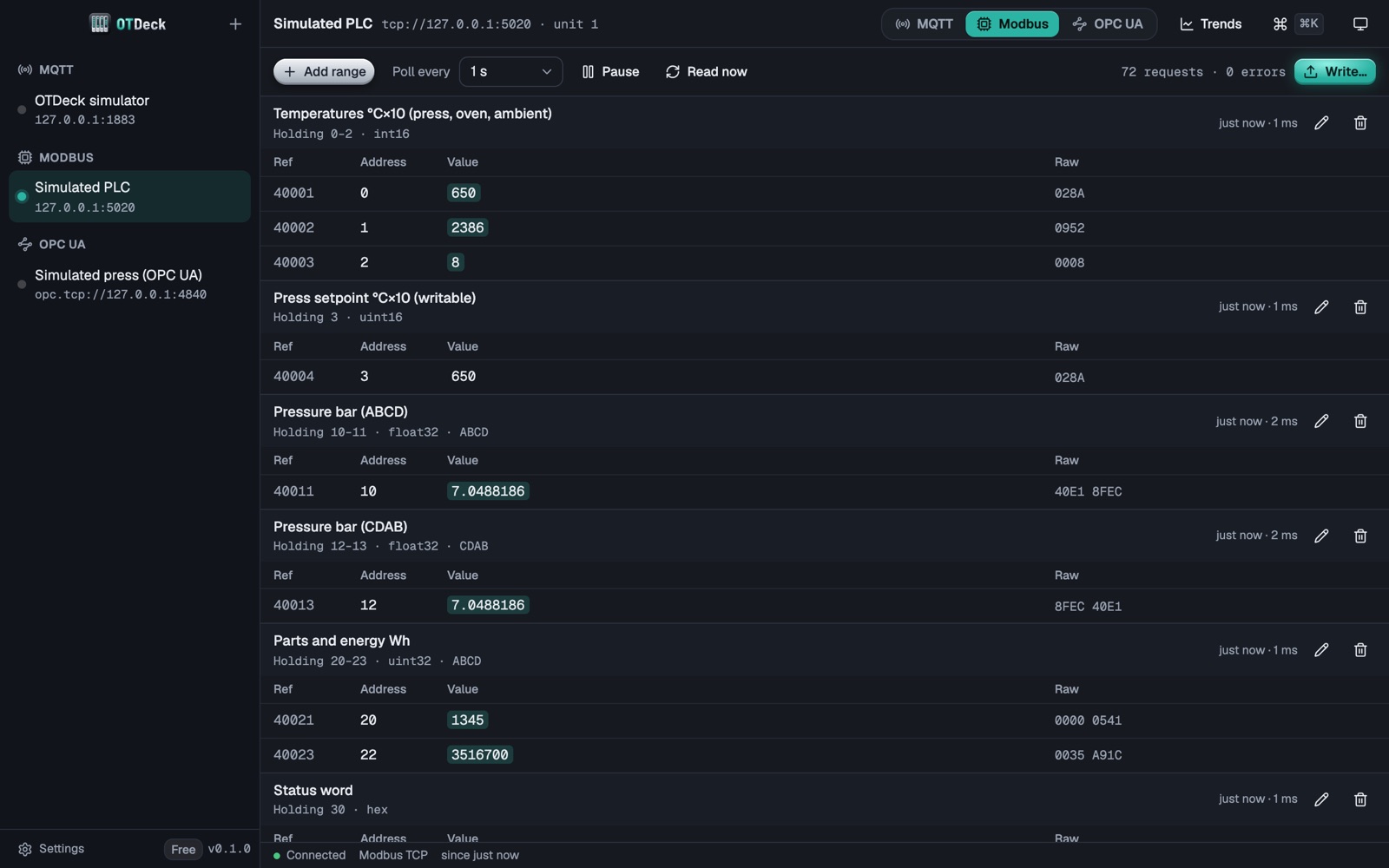
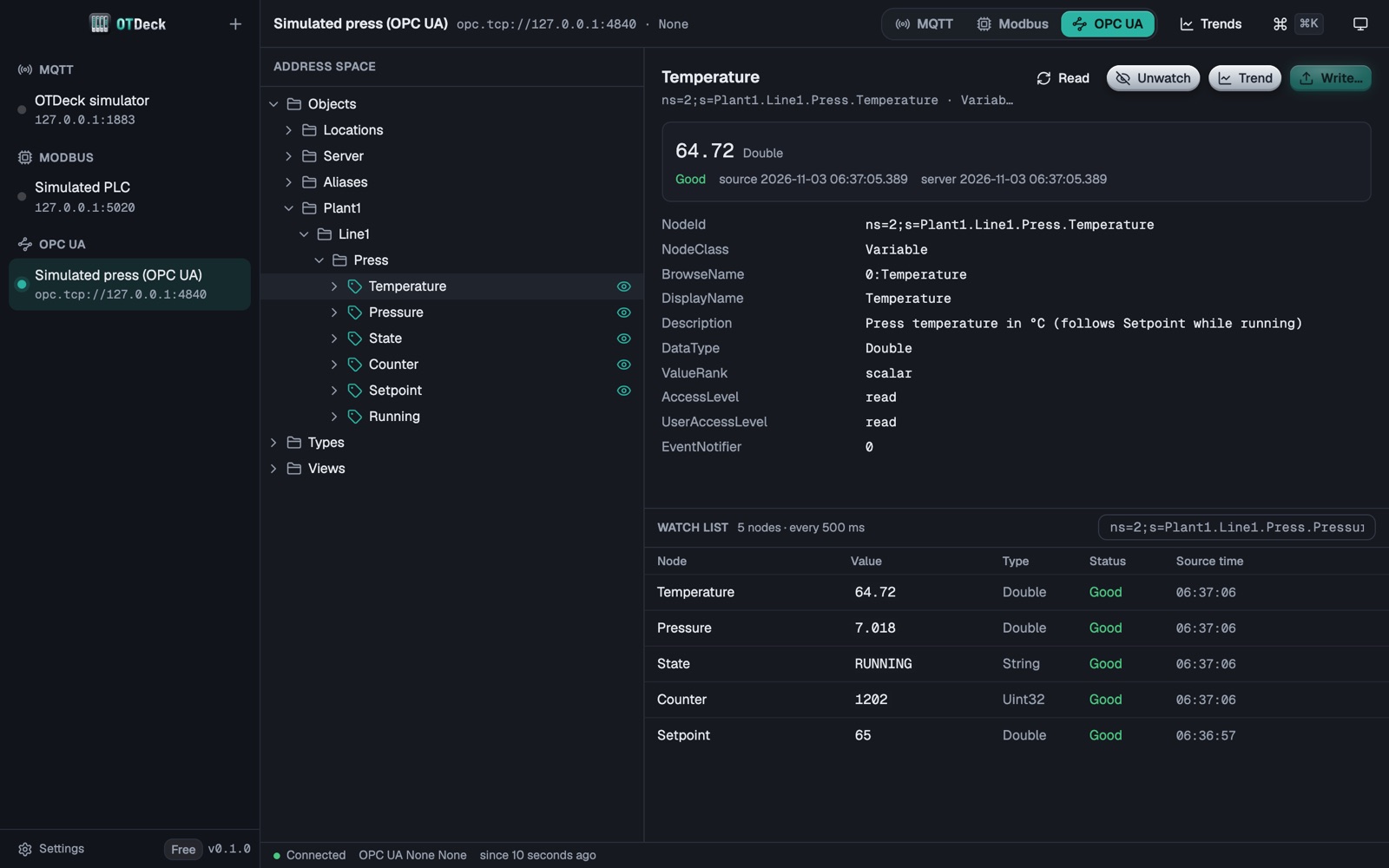
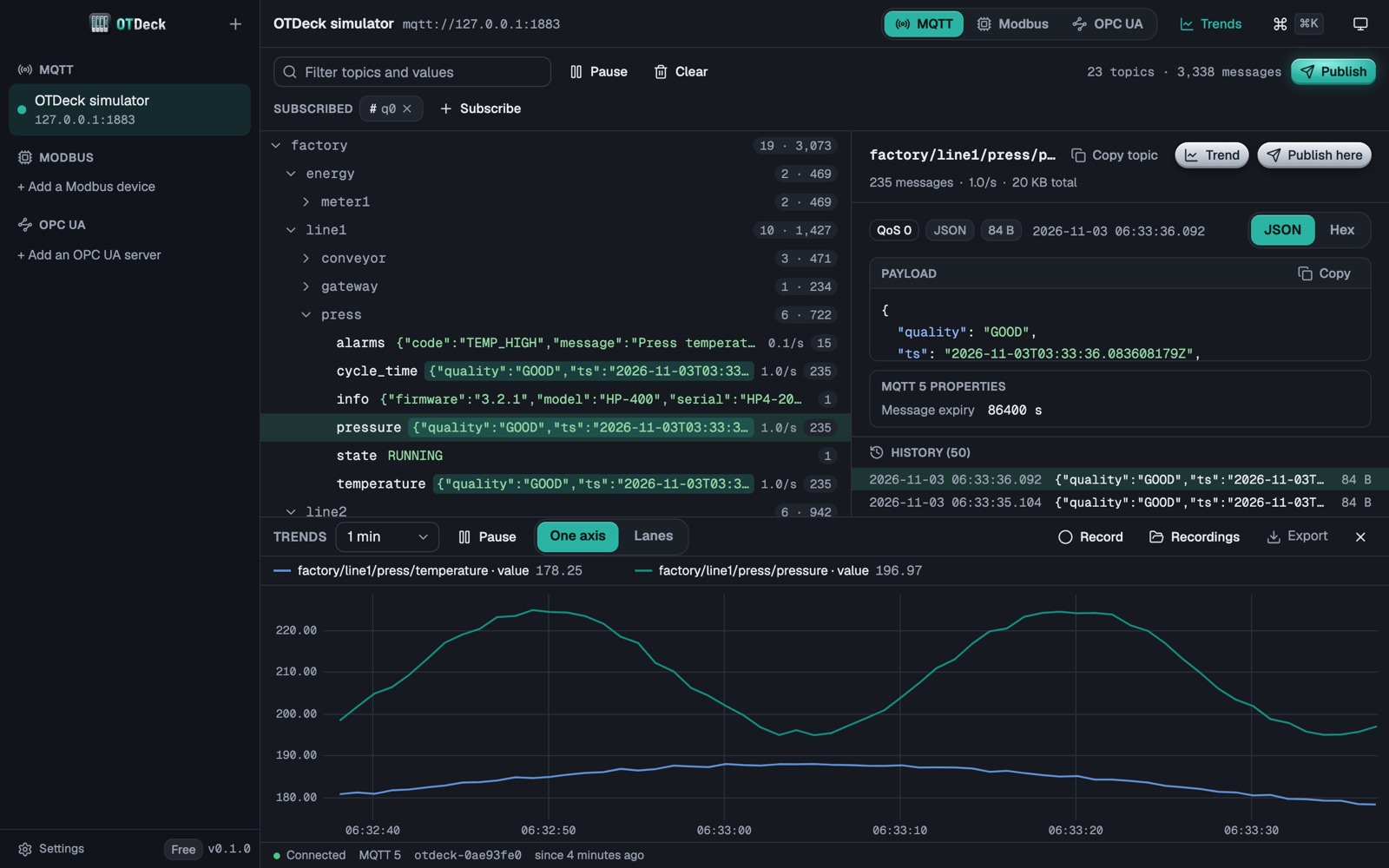
The real app, connected to its built-in simulator.
One app for three protocols
Stop switching between a Modbus tool, an MQTT tool and an OPC UA tool.
The same connection list, keyboard shortcuts, value view and safety rules for every protocol. Secrets stay in the OS keychain.
MQTT client
works today- MQTT 5 and 3.1.1 over TCP, TLS (CA and client certificates) and WebSocket
- Live topic tree with values, message counts and rates
- Payload as JSON, text or hex with size limits; retained and QoS
- Publish and subscriptions; Sparkplug B decoding
Modbus TCP and RTU client
works today- Register table for coils, discrete inputs, input and holding registers
- INT16/32, UINT, FLOAT32/64, strings; byte and word order you can switch
- Polling with a rate you set; RTU over serial ports (USB-to-RS-485)
- Writes behind production protection (Pro)
OPC UA client
works today- Browse the address space, read attributes, subscribe to monitored items
- None and Basic256Sha256 Sign/SignAndEncrypt; anonymous or user/password login
- Certificate manager for trust lists (Pro)
- Writes behind production protection (Pro)
Production write protection
Writing to a live line is never one click.
Every connection has a role: lab, staging or production. Production gets a clear frame, starts read-only, and each write needs the connection name typed. The check runs in the app's backend, not only in the UI.
Offline activation
Built for air-gapped OT networks.
OTDeck runs without internet. Activate a Pro or Team key with a request file and a response file carried from any online machine. No account, no cloud, no telemetry.
MCP server for AI agents
Ask Claude about your tags.
The built-in otdeck-mcp server gives Claude Desktop, Claude Code, Cursor, VS Code or any MCP client your saved connections: MQTT topics, Modbus registers, OPC UA nodes, trends and recordings. Read-only, every call logged. How it works
Compare
OTDeck next to the tools you already know
Modbus Poll, MQTT Explorer, UaExpert and QModMaster are good tools, and many engineers keep several of them installed. Here is what each one covers, from the vendors' own pages.
| OTDeck | Modbus Poll | MQTT Explorer | UaExpert | QModMaster | |
|---|---|---|---|---|---|
| MQTT (3.1.1 and 5) | ✓ | — | ✓ | — | — |
| Modbus TCP | ✓ | ✓ | — | — | ✓ |
| Modbus RTU (serial, RS-485) | ✓ | ✓ | — | — | ✓ |
| OPC UA | ✓ | — | — | ✓ | — |
| Windows | ✓ | ✓ | ✓ | ✓ | ✓ |
| Linux | amd64 and arm64 | — | ✓ | ✓ | build from source |
| macOS | ✓ | — | ✓ | — | — |
| Built-in simulator (MQTT, Modbus, OPC UA) | ✓ | — | — | — | — |
| Built-in MCP server for AI agents | read-only, 10 tools | — | — | — | — |
| Price | Free core; Pro $99 once | $129 per licence | Free, open source | Free download, registration | Free, open source |
Checked on the vendors' websites in November 2026. OTDeck is in private testing before its first beta. Something out of date? Write to [email protected] and we fix it.
Pricing
Free forever core. Pay once for Pro.
Every plan has all three protocols. Prices in USD; tax is added at checkout where it applies.
Free
$0 forever
- MQTT, Modbus TCP/RTU and OPC UA
- 1 connection open at a time
- Browse, read, subscribe, live values
- MQTT publish
- Trends for the last 5 minutes
- Sparkplug B decoding
- MCP server, read-only, 1 connection
Pro
$99 one-time
- Everything in Free
- Unlimited connections at once
- Writes to Modbus registers and OPC UA nodes, with production protection
- Unlimited trends, export to CSV and Parquet
- Recording and replay of sessions
- OPC UA certificate manager
- MCP on every connection (read-only)
- 1 year of updates, up to 3 devices; offline activation
Team
$149 per seat / year
- Everything in Pro
- Shared projects: devices and register lists from a file, a git checkout or a URL, no passwords inside
- Team policy: production read-only on every computer, what AI agents may read
- One key per seat, assigned by email in the customer portal
- Managed key and project deployment, offline activation
- Priority email support
Not on sale yet: OTDeck is sold only when a working build is out. 14-day money-back guarantee on every purchase (refund policy).
FAQ
Questions engineers ask
Is OTDeck a SCADA or HMI?
No. It is an engineering and diagnostics workbench: browse, read, watch and (when you allow it) write values while you commission, integrate or troubleshoot. It is not a safety system and must not be used for process control.
Is the free version really free forever?
Yes. All three protocols, browsing, reading and live values, MQTT publish, 5-minute trends and the read-only MCP server stay free, with one connection open at a time. No trial timer, no disconnect every 10 minutes.
Does it work on air-gapped networks?
Yes. OTDeck needs no internet to run. Pro and Team keys can be activated offline: the app writes a request file, you activate it at otdeck.com/activate from any online machine, and import the response file.
Can an AI agent write to my PLC?
No. The MCP server in OTDeck 0.1 has no write tools at all: agents can list connections, read MQTT topics, Modbus registers and OPC UA nodes, browse, and look at trends and recordings. Every call is logged on your computer, and production connections are read more slowly on purpose (one request per call, 500 ms apart).
Which Windows, Linux and macOS versions?
Windows 10 and 11 (x64 and Arm), Linux with GTK 4 and WebKitGTK 6.0 on amd64 and arm64 (Debian 13, Ubuntu 24.04, Fedora 40 or later; .deb, .rpm and tar.gz), and macOS 12 or later. Modbus RTU uses any serial port the OS sees, such as a USB-to-RS-485 adapter.
Does it decode Sparkplug B?
Yes, in every plan: births, deaths and data messages with metric names resolved from the births, and Sparkplug metrics can go on the trend panel. Datasets and templates are summarised, not expanded.
Can I try it without a PLC or broker?
Yes. OTDeck has a simulator built in: one click starts an MQTT broker with factory telemetry and Sparkplug B, a Modbus TCP PLC and an OPC UA server on your own computer (127.0.0.1).
What does Pro $99 one-time mean?
You pay once and get every update released for one year, on up to 3 of your devices. After that year the last version keeps working for good; renewing is optional.
When can I download it?
OTDeck 0.1 is in a closed beta: MQTT, Modbus TCP and OPC UA work against our simulators, and beta testers are trying them on real PLCs, brokers and servers. Join the waitlist and you get one email when the public download is ready.
Get the beta first.
One email when OTDeck 0.1 is ready for Windows, Linux and macOS. Tell us which protocols you use and it shapes what ships first.